Mobile User Engagement: Your Complete Guide to Success
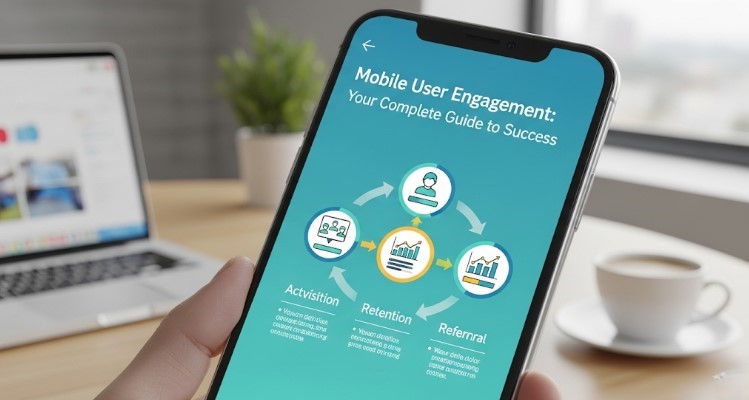
Mobile user engagement is critical as over 60% of web traffic comes from mobile devices. Optimizing mobile experiences involves understanding user behavior, implementing mobile-first design, fast-loading pages, scannable content, personalization, and leveraging device-specific features. Continuous testing, monitoring metrics, and refining strategies improve conversions, retention, and overall mobile performance.
Mobile devices now account for over 60% of all web traffic worldwide, yet many businesses still struggle to keep mobile users engaged. The small screen size, shorter attention spans, and distinct mobile behaviors create unique challenges that desktop-optimized strategies cannot fully address. Businesses must rethink their approach to capture and maintain attention on mobile platforms.
Mobile user engagement goes beyond simply making a website mobile-friendly—it requires a deep understanding of how users interact with content on their phones and tablets. When businesses design experiences that are fast, intuitive, and relevant, users are more likely to engage meaningfully, convert into customers, return frequently, and even recommend the brand to others, creating lasting value and loyalty.
Understanding Mobile User Behavior
Mobile users behave differently than their desktop counterparts. They’re often multitasking, have limited time, and expect instant results. Research shows that mobile users typically spend 69% less time reading content compared to desktop users, making every second count.
The context of mobile usage also differs significantly from desktop behavior. Users often engage with their devices in short, intermittent bursts—while commuting, waiting in line, or taking brief breaks—so mobile content must deliver value immediately and efficiently. Every interaction matters, making clarity, speed, and relevance critical for maintaining engagement.
Mobile users are highly sensitive to friction. Even minor obstacles—a slow-loading page, confusing navigation, or extra steps in a checkout process—can lead to frustration and abandonment. Prioritizing simplicity, fast performance, and seamless interactions is essential to reduce drop-offs and boost conversions. Designing mobile experiences that anticipate user needs and remove unnecessary barriers results in higher engagement, improved satisfaction, and stronger customer loyalty.
Key Metrics for Mobile User Engagement
To improve mobile user engagement, you need to track the right metrics. Start with these essential indicators:
Session Duration measures how long users stay on your mobile site. While mobile sessions are typically shorter than desktop, unusually brief sessions may indicate usability issues or content that doesn’t resonate with mobile users.
Pages per Session reveals how deeply users explore your mobile content. A low number might suggest navigation problems or content that doesn’t encourage further browsing.
Bounce Rate shows the percentage of users who leave after viewing only one page. High mobile bounce rates often point to slow loading times, poor mobile optimization, or content that doesn’t match user expectations.
Time on Page helps identify which content keeps mobile users engaged longest. This metric is particularly valuable for optimizing your most important pages.
Conversion Rate ultimately determines whether your mobile engagement efforts translate into business results. Track micro-conversions (like email signups) alongside macro-conversions (like purchases) to get a complete picture.
Mobile-First Design Principles
Creating engaging mobile experiences starts with design. Mobile-first design means prioritizing the mobile experience from the ground up, rather than adapting a desktop design for smaller screens.
Thumb-Friendly Navigation ensures users can easily interact with your interface using one hand. Place important buttons and links within easy reach of the thumb, typically in the lower two-thirds of the screen.
Clear Visual Hierarchy becomes even more critical on mobile devices. Use size, color, and spacing to guide users’ attention to the most important elements. Your primary call-to-action should be immediately obvious.
Simplified Forms remove friction from the mobile experience. Ask only for essential information and use mobile-optimized input types (like number pads for phone numbers) to make form completion easier.
Readable Typography ensures your content is accessible on small screens. Use font sizes of at least 16px and maintain sufficient contrast between text and background colors.
Page Speed and Performance Optimization

Mobile users expect fast-loading pages, and search engines reward sites that deliver them. Google’s research shows that 53% of mobile users abandon sites that take longer than three seconds to load.
Image Optimization can dramatically improve mobile page speeds. Compress images without sacrificing quality and use modern formats like WebP when possible. Implement lazy loading to load images only when they appear in the user’s viewport.
Code Minification removes unnecessary characters from your HTML, CSS, and JavaScript files. This reduces file sizes and improves loading times without affecting functionality.
Caching Strategies store frequently accessed content on users’ devices, reducing the need to download the same resources repeatedly. Implement browser caching and consider using a Content Delivery Network (CDN) to serve content from locations closer to your users.
Server Response Time impacts how quickly your pages begin loading. Optimize your database queries, use efficient hosting solutions, and consider upgrading your server resources if response times consistently exceed 200 milliseconds.
Content Strategy for Mobile Users
Mobile content strategy requires rethinking how you present information. Mobile users scan content quickly, so structure becomes crucial for engagement.
Scannable Formatting helps users quickly find the information they need. Use bullet points, short paragraphs, and descriptive headings to break up text. White space becomes your ally in creating digestible content.
Front-Loaded Information puts the most important details at the beginning of your content. Mobile users might not scroll to the end, so lead with your key message or value proposition.
Mobile-Specific Content considers the unique context of mobile usage. Create content that’s useful for on-the-go users, such as store locators, quick how-to guides, or time-sensitive offers.
Interactive Elements can boost engagement when used thoughtfully. Consider adding polls, quizzes, or expandable sections that let users control their content experience.
Leveraging Mobile-Specific Features
Smartphones offer unique capabilities that desktop experiences can’t match. Smart businesses use these features to create more engaging mobile experiences by tailoring interactions to the strengths of mobile devices. Features such as GPS-based location services allow personalized content and offers based on a user’s real-time location, enhancing relevance and convenience.
Push notifications provide timely updates, reminders, and promotions that keep your brand top-of-mind between visits, but they must be used judiciously to avoid user fatigue or uninstalls. Camera integration can enable interactive experiences like barcode scanning, augmented reality try-ons, or photo uploads for customer support, creating a more immersive and functional user experience.
Touch gestures, including swipe, pinch-to-zoom, and pull-to-refresh, allow intuitive navigation that mimics natural hand movements, making the mobile experience seamless and enjoyable. Additionally, progressive web app (PWA) features—such as offline access, home-screen installation, and app-like navigation—can make mobile sites feel more like native apps, improving engagement and retention.
By thoughtfully leveraging these mobile-specific features, businesses can provide richer, more personalized, and highly interactive experiences that increase user satisfaction, encourage repeat visits, and ultimately drive conversions.
Location Services enable personalized experiences based on where users are. Restaurants can show nearby locations, retail stores can offer in-store pickup options, and service businesses can adjust their messaging based on local conditions.
Push Notifications keep your brand top-of-mind between visits. However, use them strategically—irrelevant or too-frequent notifications quickly lead to uninstalls. Focus on genuinely valuable updates like order status, personalized recommendations, or time-sensitive offers.
Camera Integration can streamline user interactions. Consider features like barcode scanning for product information, augmented reality try-on experiences, or photo upload capabilities for customer service.
Touch Gestures create intuitive navigation options. Implement swipe gestures for image galleries, pull-to-refresh functionality, or pinch-to-zoom capabilities where appropriate.
Personalization and User Experience
Mobile personalization goes beyond simply using someone’s name. Effective personalization considers mobile-specific behaviors and preferences to create more relevant experiences.
Behavioral Targeting uses data about how users interact with your mobile site to customize their experience. Show different content to first-time visitors versus returning customers, or adjust your homepage based on previous browsing patterns.
Device-Specific Optimization recognizes that different mobile devices have different capabilities. Optimize experiences for various screen sizes, processing powers, and connection speeds.
Progressive Web App Features can make your mobile site feel more like a native app. Features like offline functionality, home screen installation, and app-like navigation can significantly boost engagement.
Testing and Optimization Strategies
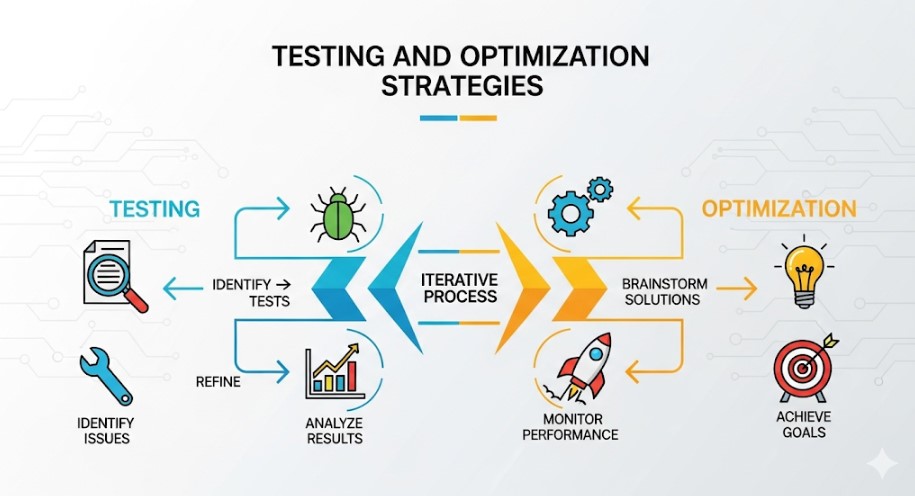
Continuous testing helps you understand what engages your specific mobile audience. Different approaches work for different businesses, so data-driven decisions are essential. By consistently analyzing user behavior and iterating based on insights, businesses can refine their mobile experience to better meet user needs and expectations, ultimately driving higher engagement and conversions.
A/B Testing lets you compare different versions of mobile pages or features. Test elements like button colors, headline copy, form lengths, or navigation styles to see what resonates with your users. Regularly running A/B tests allows you to identify incremental improvements, experiment with new ideas, and make evidence-based changes that enhance usability and overall performance.
User Session Recordings show you exactly how people interact with your mobile site. Watch for patterns like where users struggle, which elements they ignore, or where they typically drop off. These recordings provide a clear, visual understanding of user behavior, helping you uncover friction points, improve navigation, and streamline the overall user journey.
Heatmap Analysis reveals which parts of your mobile pages get the most attention. This data helps you optimize the placement of important elements and identify content that might be getting overlooked. By understanding visual attention patterns, you can strategically position calls-to-action, key messaging, and interactive features to maximize engagement and conversions.
User Feedback Collection provides qualitative insights that complement your quantitative data. Simple feedback widgets or exit-intent surveys can reveal frustrations that metrics alone might miss. Engaging directly with users allows you to capture perceptions, suggestions, and pain points, which can inform design improvements, content adjustments, and feature enhancements for a more satisfying mobile experience.
Measuring Success and ROI
Track the impact of your mobile engagement efforts using metrics that matter to your business goals. Measuring success is not a one-time activity; it’s an ongoing process that allows you to make data-driven decisions, optimize user experiences, and ensure that your mobile strategy delivers tangible business results.
Engagement Rate Trends show whether your optimization efforts are working over time. By monitoring session duration, pages per session, and return visit rates, you can gain insights into user behavior and engagement patterns. Tracking these trends over weeks or months helps you identify improvements or declines, providing actionable feedback for refining your mobile strategy.
Conversion Funnel Analysis identifies where mobile users drop off in your conversion process. Understanding these drop-off points allows you to focus your optimization efforts on the stages with the highest abandonment rates. Whether it’s a lengthy form, slow-loading page, or unclear call-to-action, analyzing the funnel helps you prioritize improvements that will have the greatest impact on conversions.
Additionally, combining engagement metrics with funnel analysis provides a holistic view of performance. For example, a page with high session duration but low conversion may indicate that content is engaging but not persuasive enough to drive action. Similarly, high bounce rates at the start of the funnel may highlight usability issues or misaligned content.
By continuously monitoring these key metrics, running A/B tests, and iterating based on findings, businesses can enhance mobile user experience, increase conversions, and ultimately maximize ROI from their mobile engagement efforts. Consistent measurement and analysis ensure that every decision is backed by real data, allowing your mobile strategy to evolve and adapt to changing user behaviors and expectations.
Conclusion:
FAQ – Mobile User Engagement
Q1: Why is mobile engagement important for businesses?
A1: Mobile devices account for the majority of web traffic. Engaging users effectively on mobile increases conversions, retention, and brand loyalty.
Q2: What are key metrics to track mobile engagement?
A2: Session duration, pages per session, bounce rate, time on page, and conversion rates.
Q3: What is mobile-first design?
A3: Designing for mobile devices from the start rather than adapting desktop designs, ensuring thumb-friendly navigation, readable typography, clear visual hierarchy, and simplified forms.
Q4: How can page speed be improved for mobile users?
A4: Optimize images, minify code, implement caching, improve server response time, and use a Content Delivery Network (CDN).
Q5: What mobile-specific features can enhance engagement?
A5: Location services, push notifications, camera integration, touch gestures, and progressive web app capabilities.
Q6: How can personalization improve mobile user experience?
A6: Use behavioral targeting, device-specific optimization, and progressive web app features to deliver relevant content and functionality based on user behavior and preferences.
Q7: How do you optimize content for mobile users?
A7: Use scannable formatting, front-loaded information, mobile-specific content, and interactive elements like polls, quizzes, or expandable sections.
Q8: What testing strategies help improve mobile engagement?
A8: A/B testing, user session recordings, heatmap analysis, and collecting qualitative user feedback.
Q9: How is ROI measured for mobile engagement?
A9: Track engagement rate trends, conversion funnel analysis, and monitor where users drop off to optimize performance.